Written by: Melissa Kirby Professional Editor
Reviewed by: Pacific Press Publishing Team
Last Updated: November 2026
A book trailer is a short clip, often 15 to 45 seconds long, that shows readers what your story feels like without walking them through the plot. Tight budget? A book trailer can still work for you. Doing it yourself costs next to nothing, and hiring someone costs more, but both give you a video you’ll keep posting well after launch week. I’ll cover what they can and can’t do, what they cost, and how to build one in a single evening.
You press publish on launch day, and the house just goes quiet. No rush of sales, no messages, just you refreshing a dashboard. A trailer alone won’t change that, but it hands strangers an easy, low-pressure way to bump into your book.
Do Book Trailers for Indie Authors Actually Sell Books?
Honestly, no, not by themselves. Almost nobody watches 20 seconds of video and then goes off to buy the book.
What happens is slower. Readers rarely trust a book the first time they see it, so they need a couple of small nudges, and a short video is about the cheapest nudge going.
Take a made-up debut romance author, Maya. She posts a clip of her two leads trading insults over soft piano. Nobody buys that day. But a few viewers hit follow, and two weeks later, when her launch post lands, those followers already know what the book feels like.
That’s the real value of a book trailer. It makes your launch feel familiar instead of random.

Why Do Book Trailers for Indie Authors Look So Different From Publisher Ones?
Publishers send out crews and lighting rigs. You’ve got a phone, a laptop, and maybe a free Saturday. Sounds like a disadvantage, and it mostly isn’t.
Readers of indie books usually respond to a real voice before they respond to polish. A trailer that’s a little rough but clearly made by the author can feel friendlier than a slick one that could be advertising anything. (BookNet Canada on how social platforms shape book discovery)
How Much Does a Book Trailer Cost?
A book trailer cost can be close to zero or run past several hundred dollars. The biggest factors are who makes it and how polished you want it. Freelancer rates swing a lot, so get a handful of current quotes before you commit to a number. (See Beverly Boy Productions on agency pricing and one author’s test of three Fiverr trailer makers)
Most authors end up in one of three places:
- DIY with templates: You pay in time, plus maybe a small app subscription. Your first one will probably eat an evening.
- Hybrid: You write the script and pick the visuals, then a freelancer cuts it together. A lot of authors end up here because it saves hours without draining the bank account.
- Fully outsourced: Someone else builds the whole thing, from concept and footage to music and the final cut. Expect the biggest bill, and expect to write a clear brief so the result matches what’s in your head.
Here’s the question I’d actually ask. Not “what’s cheapest?” but “how many clips do I get out of this?” One good edit can become a full trailer, a few teasers, and a quote video, and that changes the math.
How Do You Make a Book Trailer Step by Step?
Never touched a video editor? You’ll be fine. Learning how to make a book trailer is less scary than it looks, and six steps will get you there.
- Step 1: Pick one emotion. Dread, longing, laughter, wonder. Choose a single one, since five feelings crammed into 20 seconds just turns to mush.
- Step 2: Write a 40 to 60 word script. It needs a hook, a hint of what the story promises, and a closing line with your title and release date.
- Step 3: Collect your visuals. Your cover, licensed stock clips, or text moving over a plain background will all do the job. Check the license on everything before you post. (See the Pexels video library license and Soundstripe on music licensing for business accounts)
- Step 4: Edit in a free or cheap app. Canva and CapCut are both easy for beginners and handle short vertical video well.
- Step 5: Add captions. Many viewers scroll with the sound off, so your captions end up carrying half the message.
- Step 6: Export vertically, at 1080 by 1920 pixels. That’s the size most short-video feeds want.
Don’t cram in the whole plot. Almost everyone does it the first time, and the clip crawls. In a practical workflow, the shorter cut usually beats the “complete” one.
What Makes a Good Book Trailer?
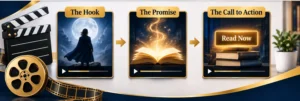
Every trailer I plan starts with the same four beats, which I call HPPP: hook, promise, proof, prompt. Sticking to them keeps a tiny video from wandering off. They also take the edge off blank-page panic, since there are only four slots to fill.
- Hook, 0 to 3 seconds: a sharp question, a strange line, or an image that feels tense.
- Promise, 3 to 10 seconds: say what kind of story they’re in for. Name the genre or the trope, and don’t be shy about it.
- Proof, 10 to 18 seconds: a real review quote, a line from the book, or a taste of what’s at stake. (FTC Endorsement Guides: What People Are Asking)
- Prompt, last 2 seconds: title, release date, one clear action.
Most book trailer examples you’ll remember fall into three types: the quote card, the character voiceover, and the “trope menu” that lists what readers are getting. They all work for the same reason. Each makes a promise in the first few seconds.
Start by watching what authors in your own genre post. (TCK Publishing’s roundup of 10 great book trailers)
Can a Trailer Help With BookTok Book Promotion?
It can, but only if it doesn’t look like an ad. For BookTok book promotion, shoot vertical, keep the cuts quick, put text on screen, and use trending audio if the licensing allows. A polished commercial often loses to something that feels like a reader gushing to a friend.
That’s where video marketing for authors gets practical. One trailer can become three posts: the full cut, a reaction to a favorite line, and a “tell me you read this genre” prompt.
Take Devon, a made-up fantasy author. He trims his 30 second trailer to a 10 second teaser built around one big reveal and posts that first. The full version follows a week later. The comments show him which twist readers care about most, so he builds his launch blurb around it.
Comments are free market research. Read them.
When Should You Release a Trailer in Your Book Launch Strategy?
Spread it out. Start four to six weeks before release and keep going for a few weeks after. A good book launch strategy gets more than one use out of the trailer, because dropping it once and crossing your fingers isn’t a plan.
- Four to six weeks out: put up a teaser and let the curiosity build.
- Two weeks out: share the full trailer and pin it to the top of your profile.
- Launch week: put it in your newsletter, on your website, and on any retailer page that takes video.
- After launch: repost it next to a fresh review or a reader’s reaction.
Platforms have different video rules, so read them before you upload. (Reedsy on adding video to Amazon Author Central)
Honestly, a decent trailer you post five times beats a perfect one you post once.
Should You DIY, Hire a Freelancer, or Use a Template Tool?
It comes down to your book and how much patience you’ve got. Short on money but long on time? Do it yourself. If the whole appeal of your book is atmosphere, pay someone who can build it. And if all you need is a few quick social clips, a template tool will do the job.
Here’s how I’d sort it:
- Romance, cozy mystery, and memoir usually do fine with a personality-driven DIY clip.
- Thrillers and epic fantasy often need mood, which a good editor can deliver.
- Template tools suit anyone making lots of short cuts fast.
Whoever you hire, put three things in writing first: the brief, a limit on revisions, and delivery of the source files. And ask who actually owns the rights to the music and footage.
Once your book trailer is ready, the next step is making sure your book is professionally prepared for readers. From manuscript preparation to final distribution, choosing reliable Book Publishing Services can help you bring your project to market with confidence.
A trailer isn’t a magic fix, either. For broader book marketing for indie authors, it should sit beside a strong cover, a clear blurb, and an email list. That’s the honest side of book trailer marketing and of any self-published book promotion plan.
Your Next Step: Make One 20 Second Trailer This Week
Don’t wait for a bigger budget. Book trailers for indie authors work best as a habit, so start small and get a little better with each one.
Try this over the next seven days:
- Pick the one emotion your book delivers.
- Write a 40 to 60 word script using HPPP.
- Build a vertical video with captions in a free app.
- Post it and see which line gets the most comments.
If that first clip brings in even a few new followers, you’ve started building an audience for your next book. (More author marketing resources on the Pacific Press Publishing blog)
