Written by: Tyler Adams Professional Editor
Reviewed by: Pacific Press Publishing Team
Last Updated: November 2026
Short answer: Amazon doesn’t build an author page for you when you publish. If your Amazon author page is missing, you most likely skipped Author Central, or you set it up and never claimed your books. A tiny spelling difference in your name between KDP and Author Central can cause the exact same problem.
Picture this. Your book goes live on KDP, you copy the link, and you click your own name to see how it looks. Instead of a nice profile, you land on a page of random search results.
Annoying, right? It happens to a lot of first-time authors. The good news is that it’s almost never a glitch. It’s a setup gap, and gaps can be fixed.
Why Is My Amazon Author Page Not Showing?
Because KDP and Author Central are two separate tools, and Amazon only builds a profile once you use the second one. KDP handles your manuscript, pricing, and royalties. Author Central handles your bio, photo, and the link between you and your books.
Plenty of authors finish every KDP screen and never open Author Central. Nothing in the publishing flow tells you to, so it’s easy to miss. Fair enough.
What you see on the book page tells you a lot about what’s wrong:
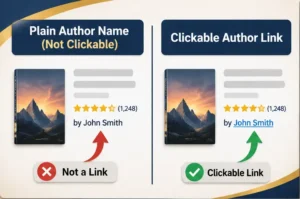
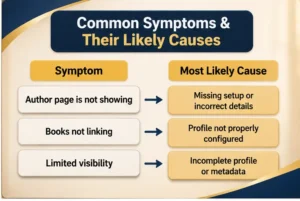
- A plain name that isn’t clickable: your book isn’t linked to any profile.
- A name that opens search results: no author page exists for that exact name.
- A profile in one country but not another: you’ve only set up one store.
- A profile that looks thin: the bio or photo is missing, or edits are still under review.
How Do I Create an Amazon Author Page?
Sign in to Author Central with your Amazon account, confirm your author name, claim your books, then add a bio and photo. It takes about twenty minutes if you have your book details handy. Here’s the order I’d follow.
- Sign in. Go to the Author Central website and log in. Using the same Amazon account as your KDP login saves headaches later.
- Confirm your name. Type it exactly as it appears on your cover and title page.
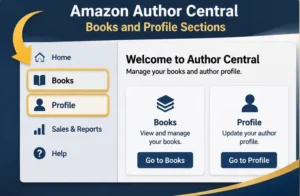
- Open the Books tab. Look for the option to add books. Amazon renames buttons now and then, so match the meaning, not the exact words.
- Search and claim. Look up your title, ISBN, or name, then confirm the book is yours.
- Fill in your profile. Add a bio and a clear photo.
- Save, then wait. Some changes show up fast, others need review.
Amazon can change processing times without warning. Check Amazon’s official Author Central help page before you promise a launch date to anyone.
Amazon Author Page Missing? Here Are the 5 Setup Mistakes Behind It
Most Amazon author page setup mistakes fall into five buckets. Check them in order, because the early ones tend to hide the later ones.
Mistake 1: Amazon Author Page Missing Because You Never Started
Publishing on KDP doesn’t create a profile. That’s the whole story for a huge share of new authors. You can’t fix what doesn’t exist yet.
Work through the six steps above and let the profile go live. If you’re brand new to the platform, this might help first: Amazon KDP publishing.
Mistake 2: Your Amazon Author Profile Is Not Linked to Your Book
Here’s a sneaky one. You can have a gorgeous Author Central profile and still see a plain name on your listing. If the book was never claimed, an Amazon author profile not linked to book pages is just a bio floating in space.
Open the Books tab and read the list. No title? Add it. Selling a paperback, an ebook, and a hardcover? Check each format on its own, because they don’t always link themselves.
Mistake 3: A KDP Author Name vs Author Central Name Mismatch
Amazon links books to author profiles through the contributor name. To a person, “Emily R. Carter” and “Emily Carter” are obviously the same writer, but to a database they can look like two different people.
Here’s a made-up example. Emily publishes her cookbook on KDP under the name “Emily R. Carter.” Later she sets up her Author Central profile as “Emily Carter.” Now she has a profile with no books attached, and a book with no profile to call home.
How you fix it depends on where the mismatch happened. Start by comparing the author name in your KDP book details with the name shown in Author Central. If the primary author name on a published book is wrong, keep in mind that Amazon doesn’t let you change that field directly after publication. You may need to create a new edition with the corrected author name. For future books, choose one version of your name before you publish and use it everywhere: the KDP contributor field, the book cover, the title page, and your Author Central profile.
Mistake 4: Setting Up Only One of the Amazon Marketplaces
Amazon’s marketplaces like the US, UK, and Germany are separate storefronts, so a reader in one country may see a complete author profile while a reader in another sees something much thinner. Author Central offers dedicated author management in selected marketplaces, including the US, UK, Germany, France, Japan, and Brazil. Other stores may show an author page built from information collected from the US marketplace, but your editing options there can be limited. Amazon’s own marketplace list shows the current picture, so check it before assuming every store needs its own setup.
Say Daniel checks his page on the US store and everything looks great. A reader in another country clicks his name and finds a bare page with no bio or photo. Daniel never knew, because he never looked.
So look. Visit every store where you actually sell, and see how your page appears there. Where Author Central lets you manage a profile, add your bio and photo directly. Where it doesn’t, make sure your US profile is complete, since that is often what the other stores borrow from.
Mistake 5: An Incomplete Profile or Edits Stuck in Review
A profile with no photo and no bio feels abandoned. Readers hesitate, and honestly, so would I. Meanwhile, edits waiting for review can make it look like nothing saved at all.
Write your bio in the third person. Two or three short paragraphs is plenty: your genre, what readers can expect, and one detail that sticks. Skip any claim you can’t back up.
Your book listing matters just as much as your profile. If the title, description, or keywords are weak, Amazon page optimization can help the whole page convert better.
How to Make My Name Clickable on Amazon Book Page?
Your name turns into a link once the book is claimed in Author Central and the contributor name matches your profile. After that, Amazon points the name to your author page. Run through this sequence:
- Check KDP. Open the book’s details page and copy the contributor name exactly.
- Compare it. Look at your Author Central name and fix any difference, even a stray initial.
- Claim the book. If it’s missing from the Books tab, add it.
- Wait. Updates aren’t always instant.
- Test in a private window. Cached pages and logged-in views can show an older version of the listing.
Still plain text after a fair wait? Reach out through the Author Central contact page with screenshots and your ISBN or ASIN. They can find the listing much faster that way.
What Is the Three Match Audit?
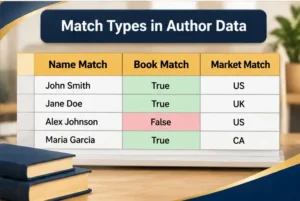
Most guides stop at “claim your books.” I’d go one step further and check three things that have to agree. Call it the Three Match Audit, and it takes roughly ten minutes.
- Name match: Is your name identical in KDP, on the cover, on the title page, and in Author Central?
- Book match: Is every format of every title claimed?
- Market match: Does your profile appear, and look finished, in each store where you sell?
The name check gets skipped the most. Nobody double-checks how they spell their own name, so small variations creep in over time. Middle initials, pen names, and nicknames are the usual troublemakers.
To make it stick, build a simple spreadsheet with one row per book format. Add columns for the name used, claim status, and stores checked. Then rerun the audit every time you publish something new. If you also want a home base beyond Amazon, an author website gives readers one more place to find you.
What Should You Do Next If Your Amazon Author Page Is Missing?
Set aside twenty minutes today and open Author Central first. Check the Books tab to see what’s really linked, then run the Three Match Audit and fix any name differences you find.
After you save, view your listing in a private browsing window. If the Amazon author page missing issue hasn’t cleared after a few days, send support your screenshots and book identifiers. Prefer expert hands on it? You can contact the Pacific Press Publishing team for help with your setup.
Readers are already clicking your name. Make sure they land somewhere worth staying.